blog · · 3 min read
CW Luma 10: a denser visual code that stays easy to scan
I’ve always liked visual codes. The usual ways to fit more data into one, more colours or smaller modules, also make it harder for a camera to read, and I had an idea for avoiding that trade-off: put most of the data where phone cameras see detail best, and let the decoder check its own work as it reads. It took many test builds, but it works now. This is CW Luma 10, CW for ChromaWeave.
The clips below were rendered from the codec and from my measurements. Each one shows one part of how it works.
01 / 08
Ten bits in every cell
Each cell is split into four quadrants, and each quadrant takes one of four brightness levels. The levels are Gray-coded, so neighbouring levels differ by one bit, and a brightness error of one level costs one bit, not two.
Two more bits set the colour of the whole cell. That gives 10 bits per cell and 1,024 possible symbols.
02 / 08
The pattern also tells the decoder where it is
The four quadrant values can also be read as 2×2 Walsh–Hadamard patterns, but the decoder samples the quadrants directly. The patterns matter at alignment.
Quadrant edges repeat every half cell. The phase of that repeating pattern in small windows shows how far each part of the grid has moved in the photo, so the decoder can follow a code that is bent, tilted or slightly out of focus.
03 / 08
Most bits go where cameras see detail
Phone cameras resolve brightness much better than colour. Bayer sensors sample green twice as often as red or blue, and photos and video usually keep colour at half resolution.
So 8 of the 10 bits go into brightness and only 2 into colour, and the colour is shared by the whole cell, so halving its resolution loses nothing. Every colour also stays within RGB 9 to 247, away from the values cameras clip.
04 / 08
Density, measured
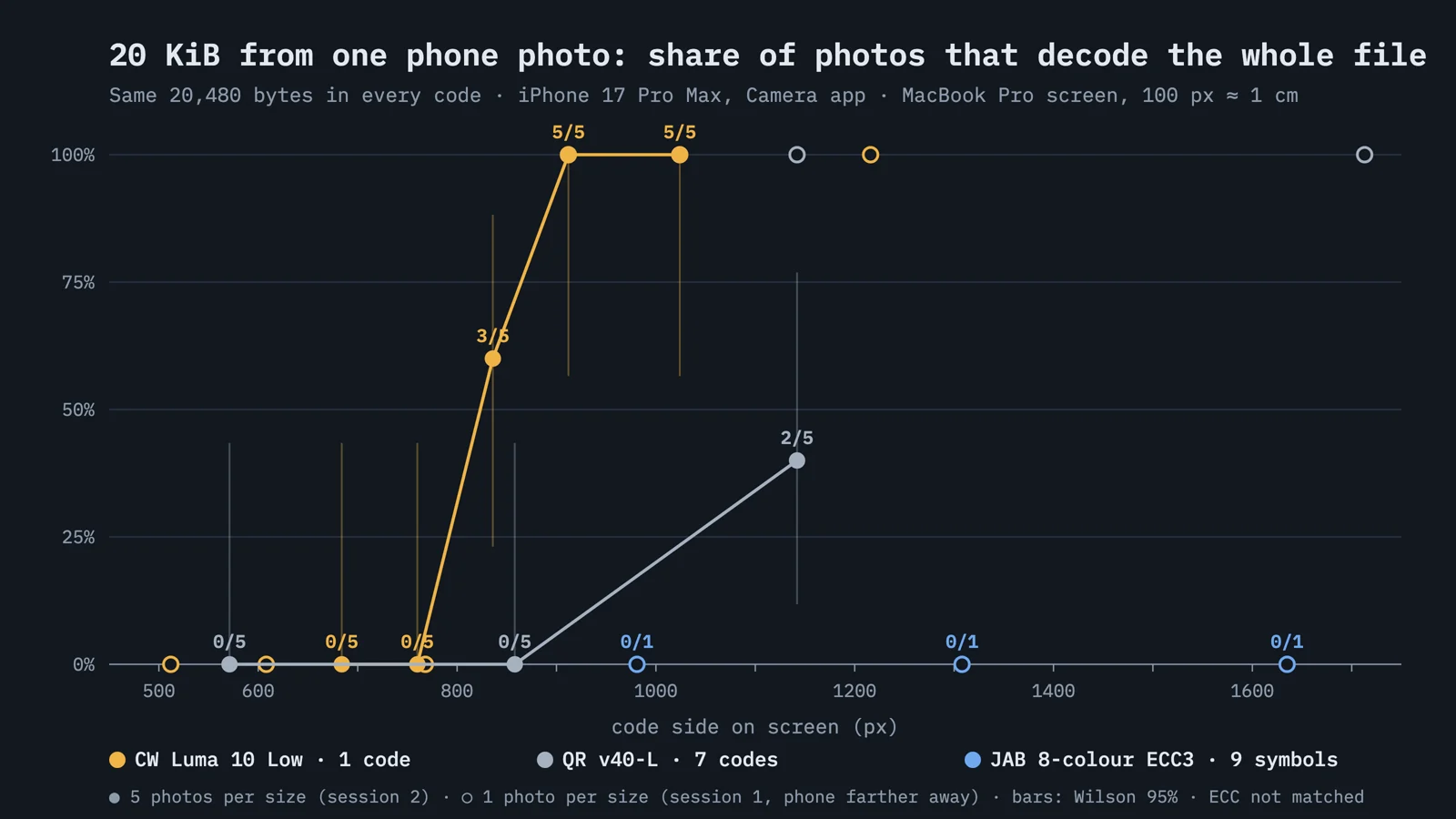
To check it, I put 20 KiB in one code and photographed it on the same screen with the same phone, five photos per size.
CW decoded 5 of 5 photos at 912 px wide, about 9 cm. Seven QR codes holding the same bytes got the whole file in 2 of 5 photos at 1142 px. JAB Code’s reference decoder didn’t read it at any size I tried, up to 1635 px.
05 / 08
The same measurements in one chart
Solid points are the second session, five photos per size, for CW and QR. Hollow points are the first session, one photo per size from a little farther away, which includes all three JAB sizes.
The error correction isn’t matched. CW Low uses Reed–Solomon 207/255, QR uses level L and JAB uses LDPC 5/9, and the JAB results come from its reference reader.
06 / 08
The decoder checks its own reads
Finder patterns fix the geometry, and Hamming-coded metadata gives the grid size. Then 128 pilot cells built from Walsh codes measure how this screen and this camera shift colours, and the decoder calibrates against them.
Each bit gets a confidence. Bytes the decoder isn’t sure about go to Reed–Solomon as erasures instead of guesses, which lets the code correct twice as many of them. The photo in the clip took 106 ms to decode.
07 / 08
Damage is spread thin
Bytes are interleaved across all the Reed–Solomon blocks, so glare or a smudge costs every block a little instead of one block a lot.
A band over 22 rows of a 20 KiB code costs each of the 99 blocks 41 or 42 bytes, under the limit of 48, and the code decodes exactly. A CRC over the payload keeps a bad read from turning into wrong data.
08 / 08
Files travel as a loop of frames
For files, the code is animated. Each frame carries a 20 KiB chunk, and every 20 chunks get 4 Reed–Solomon repair frames, so a missed frame doesn’t mean waiting for the whole loop to come around again.
A 4.5 MB file took 24 s wall clock from a laptop screen to an iPhone, SHA-256 verified, about 1.5 Mbit/s.